
It can be hard to keep up with the rapidly changing technology. AI image generation has taken off and is being used in professional settings from blogs to fashion campaigns. So how do we use it?
You need to be specific to create interesting images with AI image-generating platforms. Artificial intelligence doesn’t understand what “beautiful” means, you need to specify shapes, colors, patterns, or styles to prompt it to create interesting and imaginative images. Here are five tips for writing AI art prompts:
1. Describe the type of image you want. A photograph, digital art, 3D rendering, illustration, etc. For example, “A digital art rendering of…”
2. Describe the content. What is the subject of the image? “A digital art rendering of a tree.”
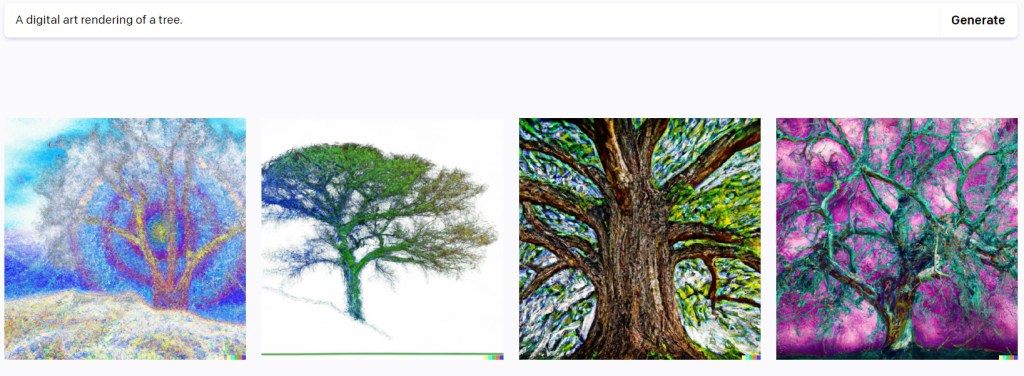
3. Get specific. Describe colors, adjectives, textures, composition, aspect ratio and other details. Keep your language simple and narrow the image down. What kind of tree? What else is in the image? Create the mood you’re looking for with your adjectives. For example, “A digital art rendering of an Angel Oak tree at dusk, off-center, with a silhouette of a person sitting beneath the tree.” Try different adjectives to adjust the end result. Avoid giving it conflicting descriptors, or you’ll confuse the AI. If you’re generating images of people, the AI will often depict White people of a stereotypical gender, so specify skin color and gender to create more diverse images.

4. Give it a style. Direct the AI to make your image minimalist, abstract expressionist, sketchy, or flat. Play around with different styles and see what results you like best. So in our example, we’d write, “A digital art rendering of an Angel Oak tree at dusk, off-center, with a silhouette of a person sitting beneath the tree, in the style of abstract expressionism.” You can also tell it to use the style of a specific artist, such as Van Gogh. Just keep copyright issues in mind (see our previous AI blog post) and avoid imitating a contemporary artist that you could instead hire to create this work. Some platforms, such as DreamStudio, have built-in styles (like neon punk, comic book or origami) that you can select instead of specifying in your prompt.


5. Switch it up. Try different platforms and vary your prompt. As you can see from our examples, changing just a few words or switching platforms can produce very different results. Experiment and see what you like best. Mix up your prompt’s adjectives and play around until you get the result you’re looking for. Have fun!
Looking for more AI tips and ways to successfuly implement it in your daily workflow? Check out our our AI guide for PR pros.
Barber Communications helps clients stay up-to-date on the latest AI developments and tools. Need some support? Get in touch!

 Barber Communications
One thought on “5 tips for prompting image generating AI”
Comments are closed.